
常规设置
应用的布局方式:导航的每个部分包含什么,以及仪表板可以让您一目了然地了解哪些信息。
此应用没有单一的设置界面。设置按功能分组,一旦了解了布局,任何内容都只需点击两次即可到达。本页就是这张地图。
| 位置 | 包含的内容 |
|---|---|
| Quote list | 您收到的所有请求,以及 Export 和 Create quote。 |
| Quote settings | Customize 编辑器、Preview 以及 Select quote products。 |
| Advanced settings | 五个标签页:Hide price、Email notifications、PDF template、Translations、Integrations。 |
| Cost management | 三个标签页:Discount、Shipping、Tax。 |
| Customer account | New customer account settings、Translation 和 Permission setting。 |
| Pricing plans | 您的套餐和计费选项。 |
| Contact us | 如何联系支持团队。 |
Quote settings 还带有 Preview,包含 Online store、Cart 和 Quote list 标签页。应用对此有明确的说明:“Preview is only for quick checking. Full settings and detailed preview are inside Customize.”
应用的首页是仪表板,它以 “Welcome to SA request a quote by Samita” 向您问候。
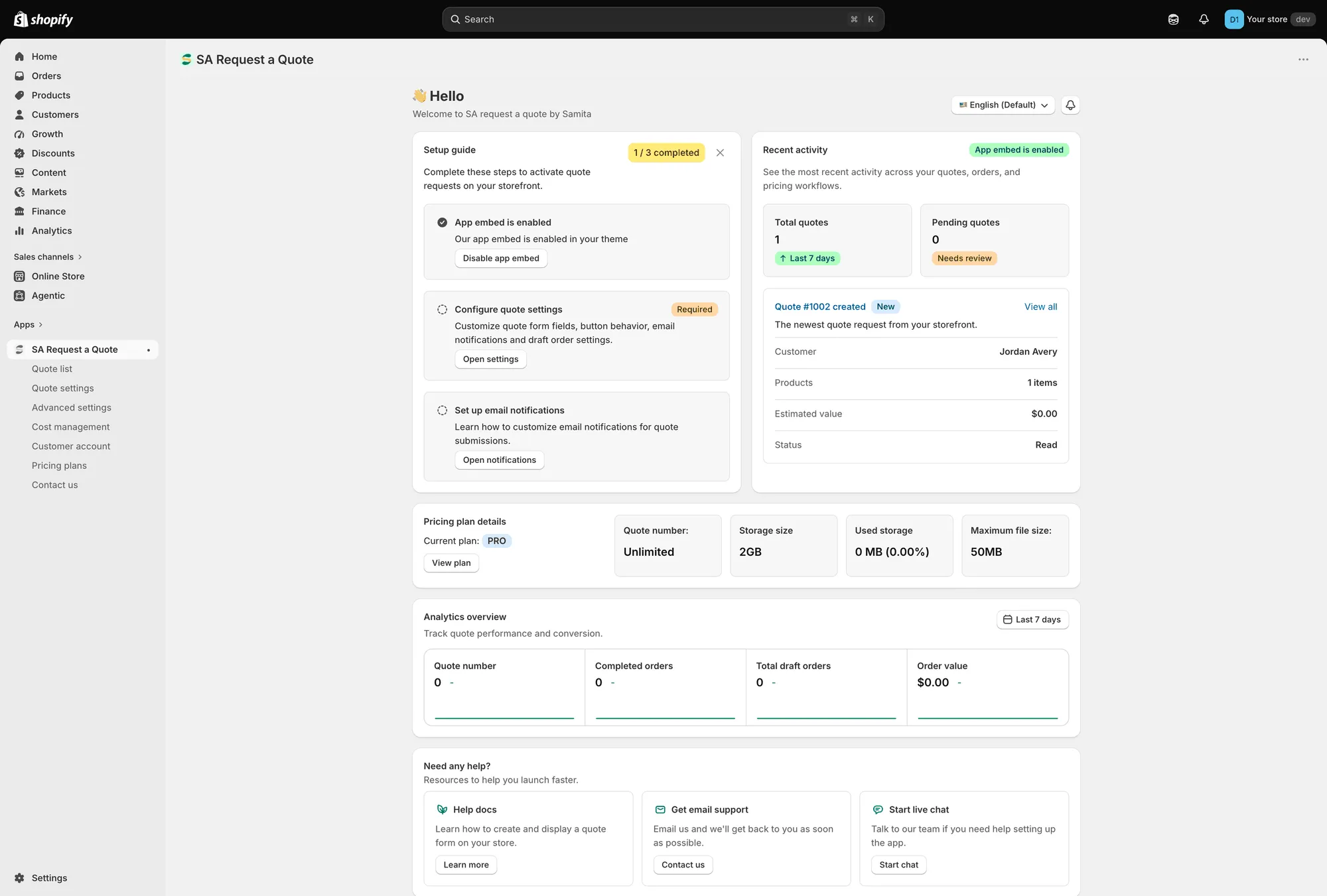
仪表板是应用的首页。
Setup guide
Section titled “Setup guide”Complete these steps to activate quote requests on your storefront. 徽章会记录您已完成三步中的几步。
| 步骤 | 作用 |
|---|---|
| App embed is enabled / App embed is disabled | “Enable app embed in your theme so quote buttons and request forms can appear on the storefront.” 使用 Enable app embed 或 Disable app embed。 |
| Configure quote settings(必需) | “Customize quote form fields, button behavior, email notifications and draft order settings.” Open settings 会带您前往。 |
| Set up email notifications | “Learn how to customize email notifications for quote submissions.” Open notifications 会带您前往。 |
应用嵌入这一步还带有 Mark as done,适用于您已用自己的方式处理好的情况。
Recent activity
Section titled “Recent activity”过去 7 天的 Total quotes、需要审核的 Pending quotes,以及一张显示最新报价的卡片,其中包含 Customer、Products、Estimated value 和 Status。View all 会打开完整的报价列表。
Pricing plan details
Section titled “Pricing plan details”您的 Current plan,以及 Quote number、Storage size、Used storage 和 Maximum file size。View plan 会打开 Pricing plans。
如果您接受文件上传,值得时不时看一眼,请参阅 允许上传文件。
Analytics overview
Section titled “Analytics overview”“Track quote performance and conversion.” 使用日期范围选择器选择时间段,卡片会报告 Quote number、Completed orders、Total draft orders 和 Order value,一端是报价请求,另一端是收入。
Need any help?
Section titled “Need any help?”三种求助途径:Help docs(带 Learn more)、Get email support(带 Contact us)以及 Start live chat(带 Start chat)。
右上角的两个控件
Section titled “右上角的两个控件”Language switch 和 What news 位于仪表板上方。
在 Hide price 标签页保存
Section titled “在 Hide price 标签页保存”Advanced settings 下的 Hide price 标签页有自己的 Save 和 Discard changes,因此请在那里进行更改、保存,然后再继续其他操作。
常用设置的位置
Section titled “常用设置的位置”| 如果您想… | 前往 |
|---|---|
| 更改报价按钮的文字或颜色 | Quote settings > Customize > Button & widget |
| 选择哪些产品显示该按钮 | Quote settings > Select quote products |
| 更改报价表单上的字段 | Quote settings > Customize > Quote form |
| 隐藏价格或购买按钮 | Advanced settings > Hide price |
| 更改接收通知的人,或使用您自己的地址发送 | Advanced settings > Email notifications |
| 编辑报价单或发票 PDF | Advanced settings > PDF template |
| 翻译客户看到的内容 | Advanced settings > Translations |
| 连接邮件营销平台或 Google reCAPTCHA | Advanced settings > Integrations |
| 为报价添加折扣、运费或税费 | Cost management |
| 在客户账户中显示报价 | Customer account |
控件呈灰色表示套餐限制
Section titled “控件呈灰色表示套餐限制”不在您套餐中的功能不会从这些页面上消失。控件会留在原处并被禁用,同时显示一行写着“🔐 This feature is available on …”的锁形提示,并附有包含该功能的套餐链接。
在您去模板中查找故障之前,了解这一点很有价值。在 FREE 商店中,您最常在 Hide price 标签页以及 Hide Add To Cart button 和 Hide Buy Now button 开关上遇到这种情况。
请点击锁形提示中的链接,或参阅 Pricing plans 和 套餐对比。
- 翻译店面文字 — 更改客户看到的内容
- Pricing plans — 您的套餐包含的内容
- 快速入门 — 获得可用报价按钮的最短途径