
一般設定
アプリの構成、ナビゲーションの各部分の内容、ダッシュボードで一目でわかることを説明します。
このアプリには、1つにまとまった設定画面はありません。設定は役割ごとにグループ化されており、構成がわかれば、どこにでも2クリックで到達できます。このページはそのマップです。
アプリのナビゲーション
Section titled “アプリのナビゲーション”| 場所 | 内容 |
|---|---|
| Quote list | 受け取ったすべての依頼。ExportとCreate quoteがあります。 |
| Quote settings | Customizeエディタ、Preview、Select quote products。 |
| Advanced settings | 5つのタブ:Hide price、Email notifications、PDF template、Translations、Integrations。 |
| Cost management | 3つのタブ:Discount、Shipping、Tax。 |
| Customer account | New customer account settings、Translation、Permission setting。 |
| Pricing plans | ご利用のプランと請求オプション。 |
| Contact us | サポートチームへの連絡方法。 |
Quote settingsには、Online store、Cart、Quote listのタブがあるPreviewもあります。アプリはこの機能について、「Preview is only for quick checking. Full settings and detailed preview are inside Customize.」と明記しています。
ダッシュボード
Section titled “ダッシュボード”アプリのトップページはダッシュボードで、「Welcome to SA request a quote by Samita」と表示されます。
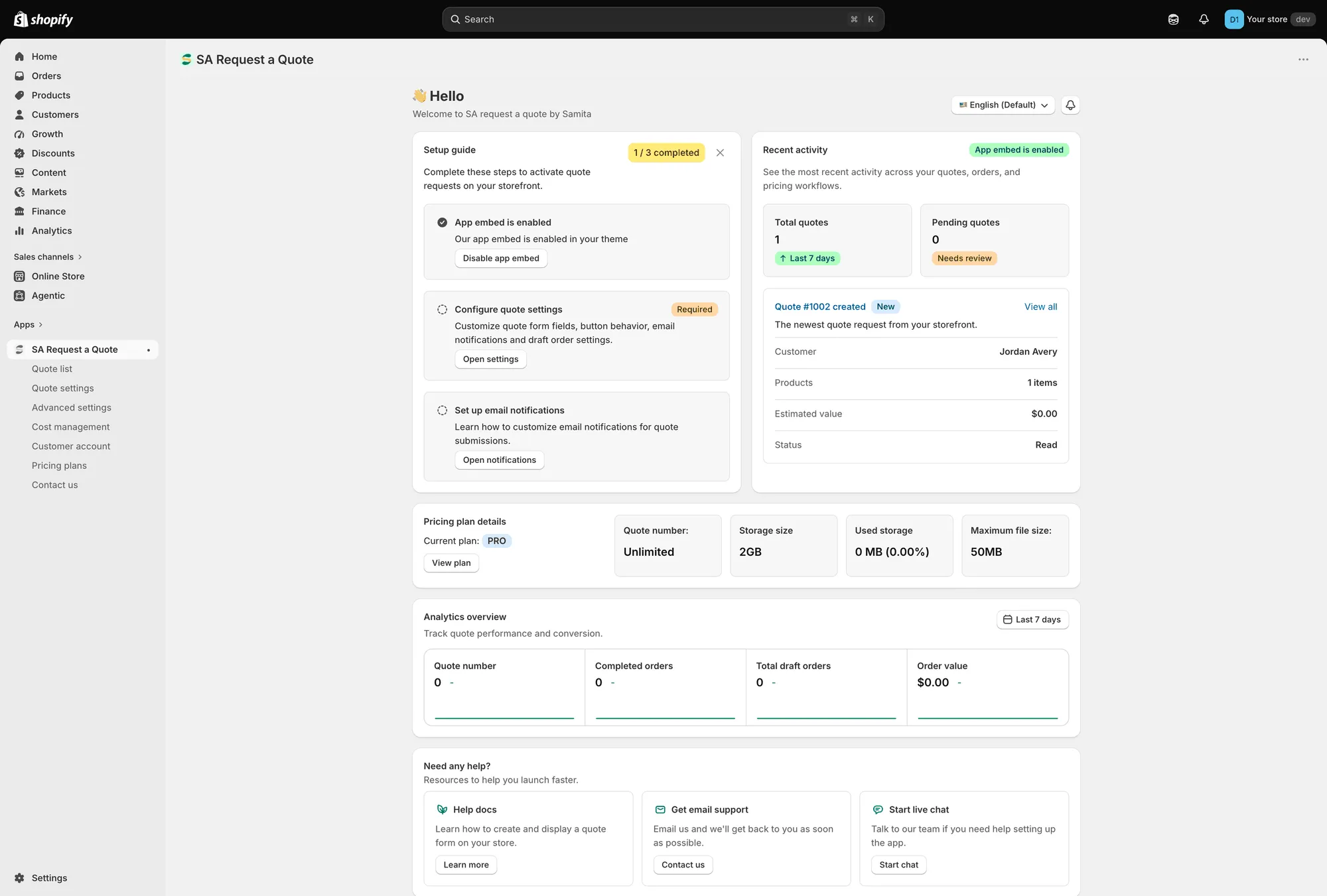
ダッシュボードは、アプリのトップページです。
Setup guide
Section titled “Setup guide”Complete these steps to activate quote requests on your storefront. バッジで、3つのうちいくつ完了したかがわかります。
| ステップ | 内容 |
|---|---|
| App embed is enabled / App embed is disabled | 「Enable app embed in your theme so quote buttons and request forms can appear on the storefront.」Enable app embedまたはDisable app embedを使用します。 |
| Configure quote settings (Required) | 「Customize quote form fields, button behavior, email notifications and draft order settings.」Open settingsで設定画面に移動します。 |
| Set up email notifications | 「Learn how to customize email notifications for quote submissions.」Open notificationsで設定画面に移動します。 |
アプリの埋め込みのステップにはMark as doneもあり、すでに別の方法で対応済みの場合に使用します。
Recent activity
Section titled “Recent activity”過去7日間のTotal quotes、確認が必要なPending quotes、そして最新の見積もりのCustomer、Products、Estimated value、Statusを表示するカードがあります。View allで、見積もり一覧全体が開きます。
Pricing plan details
Section titled “Pricing plan details”Current planに加えて、Quote number、Storage size、Used storage、Maximum file sizeが表示されます。View planで料金プランが開きます。
ファイルのアップロードを受け付けている場合は、ときどき確認しておくとよいでしょう。ファイルのアップロードを許可するをご覧ください。
Analytics overview
Section titled “Analytics overview”「Track quote performance and conversion.」期間選択で期間を選ぶと、カードにQuote number、Completed orders、Total draft orders、Order valueが表示されます。一方の端が見積もり依頼、もう一方の端が売上です。
Need any help?
Section titled “Need any help?”サポートへの経路は3つあります。Learn more付きのHelp docs、Contact us付きのGet email support、Start chat付きのStart live chatです。
右上の2つのコントロール
Section titled “右上の2つのコントロール”ダッシュボードの上に、Language switchとWhat newsがあります。
Hide priceタブでの保存
Section titled “Hide priceタブでの保存”Advanced settingsのHide priceタブには、専用のSaveとDiscard changesがあります。そこで変更を加えたら保存してから、次に進んでください。
よく使う設定の場所
Section titled “よく使う設定の場所”| やりたいこと | 移動先 |
|---|---|
| 見積もりボタンの文言や色を変更する | Quote settings > Customize > Button & widget |
| ボタンを表示する商品を選ぶ | Quote settings > Select quote products |
| 見積もりフォームのフィールドを変更する | Quote settings > Customize > Quote form |
| 価格や購入ボタンを非表示にする | Advanced settings > Hide price |
| 通知の受信者を変更する、または独自のアドレスから送信する | Advanced settings > Email notifications |
| 見積もりや請求書のPDFを編集する | Advanced settings > PDF template |
| お客様に表示される内容を翻訳する | Advanced settings > Translations |
| メールプラットフォームやGoogle reCAPTCHAを連携する | Advanced settings > Integrations |
| 見積もりに割引、配送料、税金を追加する | Cost management |
| お客様のアカウントに見積もりを表示する | Customer account |
グレー表示のコントロールはプランによる制限です
Section titled “グレー表示のコントロールはプランによる制限です”ご利用のプランに含まれない機能は、これらのページから消えません。コントロールはその場所に残ったまま無効になり、鍵アイコン付きで「🔐 This feature is available on …」と表示され、それを含むプランへのリンクが示されます。
テーマの不具合を探す前に、このことを知っておくと役立ちます。FREEのストアでは、Hide priceタブと、Hide Add To Cart buttonおよびHide Buy Now buttonのスイッチで最もよく遭遇します。
鍵アイコンの行のリンクをたどるか、料金プランとプランの比較をご覧ください。
次のステップ
Section titled “次のステップ”- ストアフロントのテキストを翻訳する — お客様に表示される内容を変更します
- 料金プラン — ご利用のプランに含まれる内容
- クイックスタート — 見積もりボタンを動かすための最短ルート