
报价表单概览
了解报价表单的位置、它可以收集哪些信息,以及在开始修改之前表单构建器是如何组织的。
报价表单是客户用来向您发送请求的表单。与它有关的一切(从哪个模板开始、询问哪些问题、外观如何)都在同一个位置设置。
在哪里找到它
Section titled “在哪里找到它”打开 Quote settings。页面标题为 Request a Quote,第一张卡片是 Customize:
Design how your request a quote experience will look to customers. Set button behavior, quote form, quote cart, widget, colors and messages.
点击 Customize 打开全屏编辑器。编辑器有四个标签页:Button & widget、Quote form、Quote cart page 和 Success message。本页的所有内容都在 Quote form 标签页上。
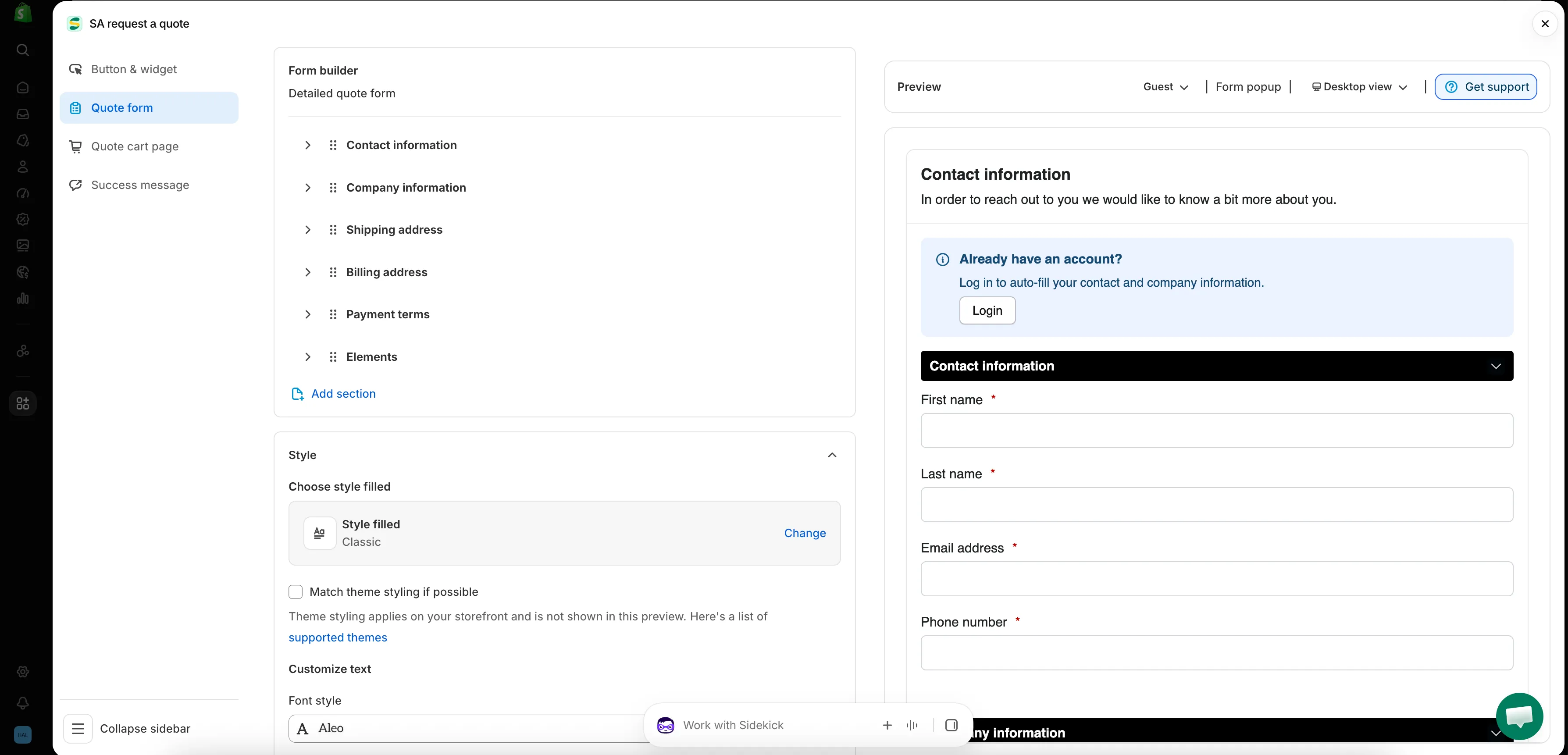
应用中的每个表单都在这一个界面中构建。
Quote form 标签页的组织方式
Section titled “Quote form 标签页的组织方式”| 区块 | 控制的内容 |
|---|---|
| Form template | 表单起始使用的模板,例如 B2B customer form。Change 会打开模板选择器。 |
| Product page form display | “Show the quote form directly on product pages.” 由 Enable product page form display 复选框控制。 |
| Form builder | 问题本身,按区块分组。Add element 向区块添加字段;Add section 添加一个全新的区块。 |
| Style | 样式预设,以及 Match theme styling if possible 复选框。 |
| Customize text | 表单的 Font style。 |
| Customize form color | Title bar color, Title bar background, Color, Background color, Border color 和 Quote popup primary color。 |
选择合适的模板
Section titled “选择合适的模板”Form template 位于标签页顶部,它决定了标签页其余部分的样子。可供选择的模板不止一个,点击 Change 会打开选择器。
| 模板 | 应用对它的描述 |
|---|---|
| Detailed quote form | "For custom orders, delivery, installation, or project-based quotes. Includes login autofill guidance." |
| B2B customer form | "For wholesale or business buyers who need company, shipping, billing, and payment term information" |
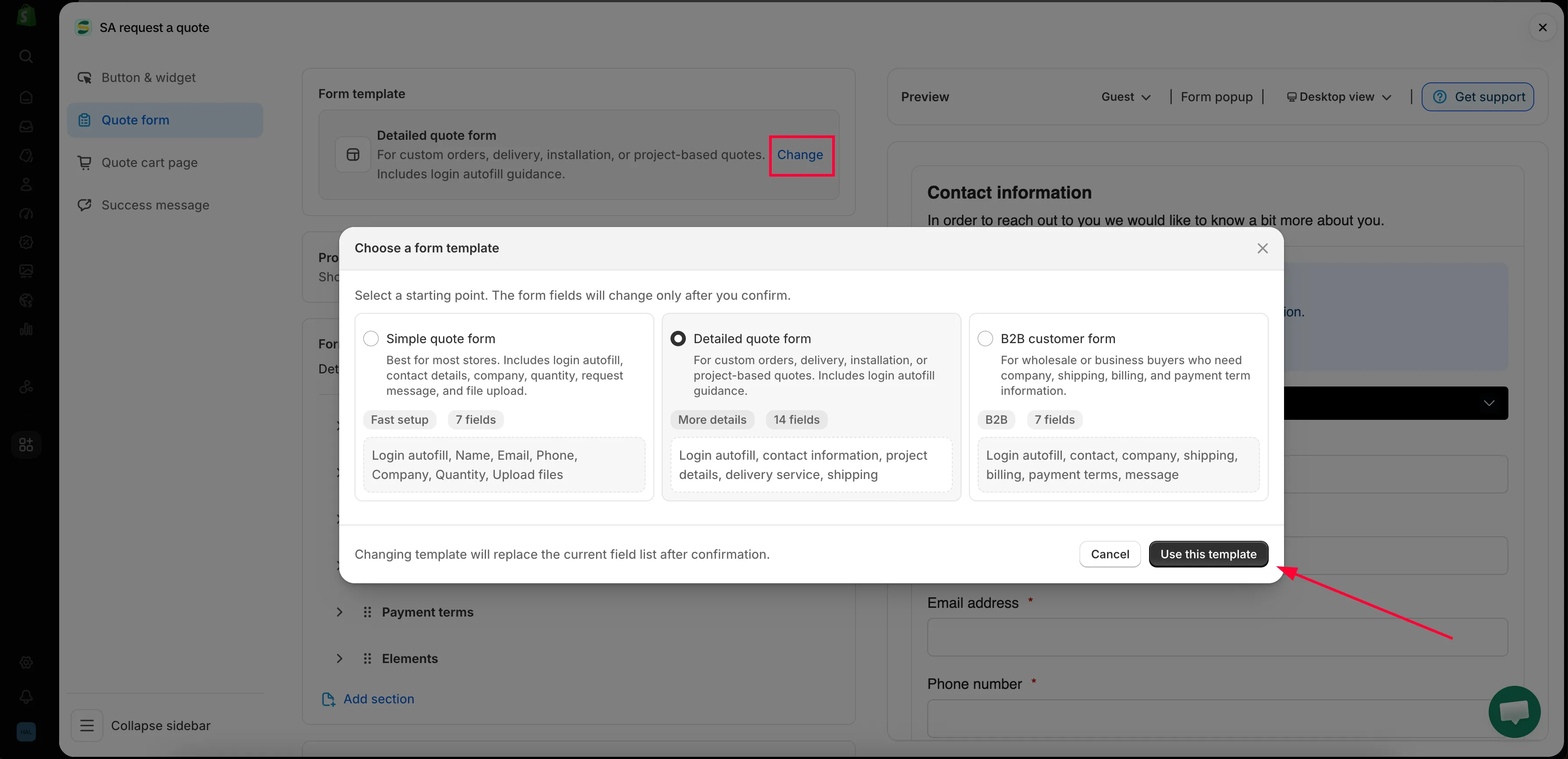
Change 会打开选择器,模板决定了标签页的其余内容。
Form builder 中的区块
Section titled “Form builder 中的区块”构建器中的区块是您的模板自带的,因此这份列表在每家商店中并不相同。
| 模板 | 自带的区块 |
|---|---|
| Detailed quote form | Contact information · Shipping address · Extra info |
| B2B customer form | Contact information · Company information · Shipping address · Billing address · Payment terms · Extra info |
每个区块都可以展开,以便查看和编辑其中的字段。
| 区块 | 收集的内容 |
|---|---|
| Contact information | First name, Last name, Email address, Phone number, Address |
| Company information | Company name |
| Shipping address | Country/region, First name, Last name, Company/attention, Address, Apartment suite etc, City, Postal code, Phone number |
| Billing address | 一个 Billing address same as shipping address 复选框,然后是相同的字段 |
| Payment terms | Payment terms、一个 Required deposit 复选框,以及 Deposit |
| Extra info | B2B customer form 中为 Message;Detailed quote form 中为 Project detail 和 Delivery service,以及您自己添加的其他内容 |
其他标签页上的内容
Section titled “其他标签页上的内容”商家常在 Quote form 标签页上寻找的两项内容,实际上位于 Quote cart page:
- Enable Quote Sections — “Lets customers group the products in their quote cart into named sections.”
- Quote form appearance — “Controls how the quote form looks on the quote cart page.” 可选择 Multiple step 或 Single page。
报价按钮本身的文字和位置在 Button & widget 中设置。
- 构建标准表单 — 从头到尾构建您的表单
- 构建 B2B 表单 — B2B customer form,包含公司、账单和付款条款
- 客户信息字段 — 联系方式和地址详情
- 报价产品分组 — 让客户将报价拆分为命名的区块
- 允许上传文件 — 应用接受哪些文件类型,以及上传占用的存储空间
- 匹配模板样式 — 让表单与商店的其他部分保持一致
- 添加 reCAPTCHA — 阻止垃圾提交
少问一些,比您想的更好
Section titled “少问一些,比您想的更好”您添加的每个字段都是客户放弃表单的一个理由。只询问生成报价所必需的内容,通常是联系方式、数量和一个自由文本框。之后您随时可以通过邮件跟进。