
一般設定
App 的配置方式:導覽的每個部分包含什麼,以及儀表板能讓您一眼看到什麼。
這個 App 沒有單一的設定畫面。設定是依功能分組的,只要了解配置,任何設定都只需點擊兩次。本頁就是這份地圖。
App 的導覽
Section titled “App 的導覽”| 位置 | 內容 |
|---|---|
| Quote list | 您收到的所有詢價,並有 Export 和 Create quote。 |
| Quote settings | Customize 編輯器、Preview 和 Select quote products。 |
| Advanced settings | 五個分頁:Hide price、Email notifications、PDF template、Translations、Integrations。 |
| Cost management | 三個分頁:Discount、Shipping、Tax。 |
| Customer account | New customer account settings、Translation 和 Permission setting。 |
| Pricing plans | 您的方案和計費選項。 |
| Contact us | 如何聯繫支援團隊。 |
Quote settings 還有一個 Preview,分頁包括 Online store、Cart 和 Quote list。App 對它的定位說得很清楚:“Preview is only for quick checking. Full settings and detailed preview are inside Customize.”
App 的登陸頁面是儀表板,它以 “Welcome to SA request a quote by Samita” 迎接您。
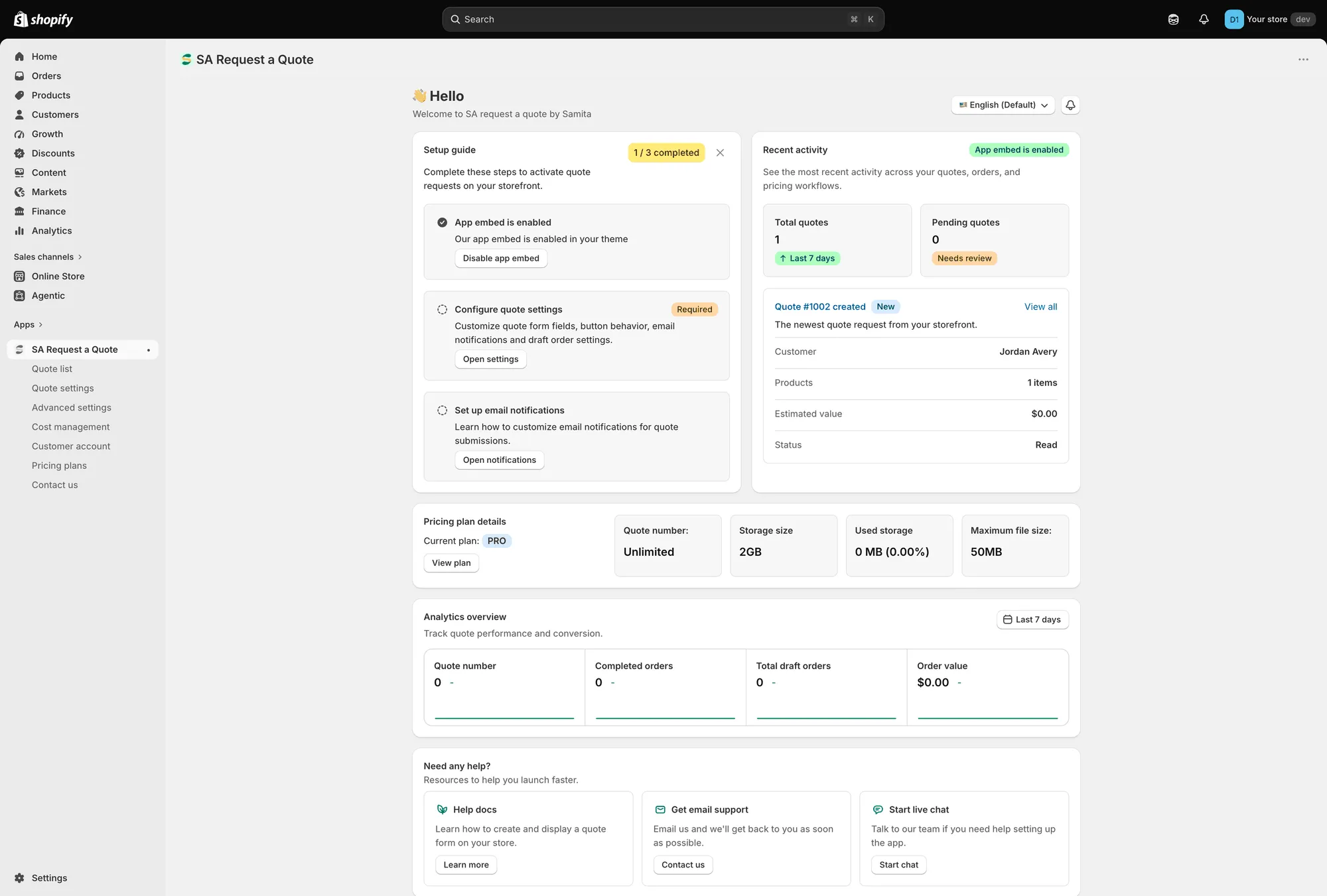
儀表板是 App 的登陸頁面。
Setup guide
Section titled “Setup guide”Complete these steps to activate quote requests on your storefront. 徽章會追蹤三個步驟中您已完成幾個。
| 步驟 | 功能 |
|---|---|
| App embed is enabled / App embed is disabled | "Enable app embed in your theme so quote buttons and request forms can appear on the storefront." 使用 Enable app embed 或 Disable app embed。 |
| Configure quote settings (Required) | "Customize quote form fields, button behavior, email notifications and draft order settings." Open settings 會帶您前往。 |
| Set up email notifications | "Learn how to customize email notifications for quote submissions." Open notifications 會帶您前往。 |
應用程式嵌入步驟還有 Mark as done,適用於您已用自己的方式處理好的情況。
Recent activity
Section titled “Recent activity”過去 7 天的 Total quotes、需要審核的 Pending quotes,以及最新一筆報價的卡片,顯示其 Customer、Products、Estimated value 和 Status。View all 會開啟完整的報價清單。
Pricing plan details
Section titled “Pricing plan details”您的 Current plan,以及 Quote number、Storage size、Used storage 和 Maximum file size。View plan 會開啟定價方案。
如果您接受檔案上傳,偶爾看一下很值得,請參閱允許檔案上傳。
Analytics overview
Section titled “Analytics overview”“Track quote performance and conversion.” 用日期範圍選擇器挑選一段期間,該卡片會呈現 Quote number、Completed orders、Total draft orders 和 Order value:一端是詢價,另一端是金額。
Need any help?
Section titled “Need any help?”有三種求助方式:Help docs 搭配 Learn more、Get email support 搭配 Contact us,以及 Start live chat 搭配 Start chat。
右上角的兩個控制項
Section titled “右上角的兩個控制項”Language switch 和 What news 位於儀表板上方。
在 Hide price 分頁儲存
Section titled “在 Hide price 分頁儲存”Advanced settings 下的 Hide price 分頁有自己的 Save 和 Discard changes,因此請在那裡進行變更、儲存,然後再前往其他地方。
常用設定的位置
Section titled “常用設定的位置”| 如果您想要…… | 前往 |
|---|---|
| 變更報價按鈕的文字或顏色 | Quote settings > Customize > Button & widget |
| 選擇哪些商品顯示按鈕 | Quote settings > Select quote products |
| 變更詢價表單上的欄位 | Quote settings > Customize > Quote form |
| 隱藏價格或購買按鈕 | Advanced settings > Hide price |
| 變更通知對象,或以您自己的地址寄送 | Advanced settings > Email notifications |
| 編輯報價單或發票 PDF | Advanced settings > PDF template |
| 翻譯顧客看到的內容 | Advanced settings > Translations |
| 連接電子郵件平台或 Google reCAPTCHA | Advanced settings > Integrations |
| 為報價加入折扣、運費或稅金 | Cost management |
| 在顧客帳號中顯示報價 | Customer account |
灰色的控制項代表方案限制
Section titled “灰色的控制項代表方案限制”不在您方案中的功能不會從這些頁面消失。控制項會留在原處並被停用,附上一行掛鎖字樣「🔐 This feature is available on …」,以及包含該功能之方案的連結。
在您去佈景主題中尋找問題之前,值得先知道這一點。在 FREE 商店中,您最常在 Hide price 分頁,以及 Hide Add To Cart button 和 Hide Buy Now button 開關上遇到這種情況。