
Teklif formuna genel bakış
Teklif formunun nerede bulunduğu, neler toplayabildiği ve değişiklik yapmadan önce form oluşturucunun nasıl düzenlendiği.
Teklif formu, müşterinin size talep göndermek için doldurduğu formdur. Hangi şablonla başlayacağınız, hangi soruları soracağınız ve formun nasıl görüneceği gibi her şey tek bir yerden ayarlanır.
Nerede bulunur
Bölüm başlığı “Nerede bulunur”Quote settings sayfasını açın. Sayfa başlığı Request a Quote, ilk kart ise Customize kartıdır:
Design how your request a quote experience will look to customers. Set button behavior, quote form, quote cart, widget, colors and messages.
Tam ekran düzenleyiciyi açmak için Customize düğmesine tıklayın. Düzenleyicide dört sekme vardır: Button & widget, Quote form, Quote cart page ve Success message. Bu sayfadaki her şey Quote form sekmesindedir.
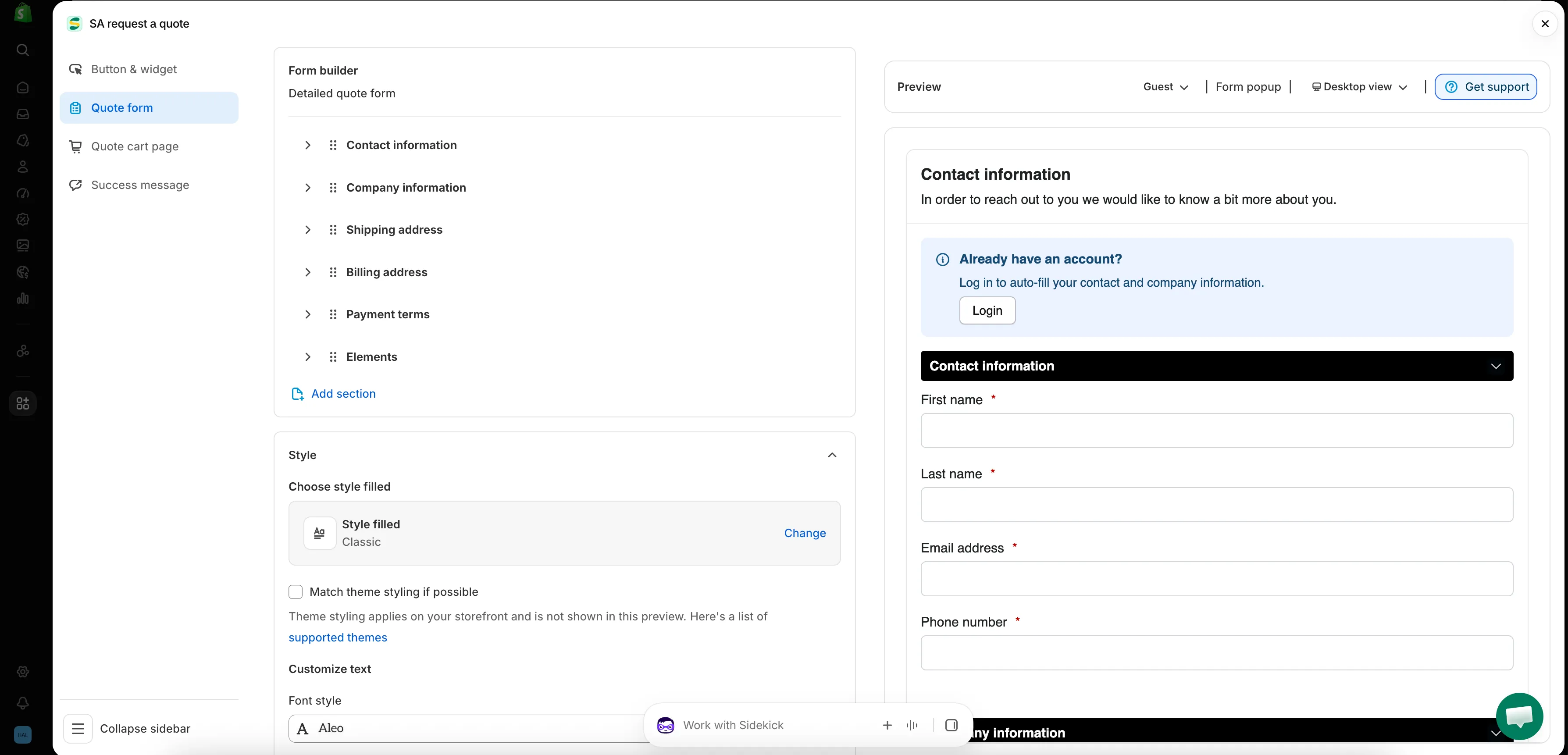
Uygulamadaki her form bu tek ekranda oluşturulur.
Quote form sekmesinin düzeni
Bölüm başlığı “Quote form sekmesinin düzeni”| Bölüm | Neyi denetler |
|---|---|
| Form template | Formunuzun başlangıç noktası olan şablon, örneğin B2B customer form. Change düğmesi şablon seçiciyi açar. |
| Product page form display | “Show the quote form directly on product pages.” Enable product page form display onay kutusuyla denetlenir. |
| Form builder | Bölümlere ayrılmış sorular. Add element bir bölüme alan ekler; Add section tamamen yeni bir bölüm ekler. |
| Style | Stil ön ayarı ve Match theme styling if possible onay kutusu. |
| Customize text | Form için Font style. |
| Customize form color | Title bar color, Title bar background, Color, Background color, Border color ve Quote popup primary color. |
Doğru şablonla başlayın
Bölüm başlığı “Doğru şablonla başlayın”Form template sekmenin en üstünde yer alır ve sekmenin geri kalanının nasıl görüneceğini belirler. Seçebileceğiniz birden fazla şablon vardır; Change düğmesi seçiciyi açar.
| Şablon | Uygulamanın tanımı |
|---|---|
| Detailed quote form | “For custom orders, delivery, installation, or project-based quotes. Includes login autofill guidance.” |
| B2B customer form | “For wholesale or business buyers who need company, shipping, billing, and payment term information” |
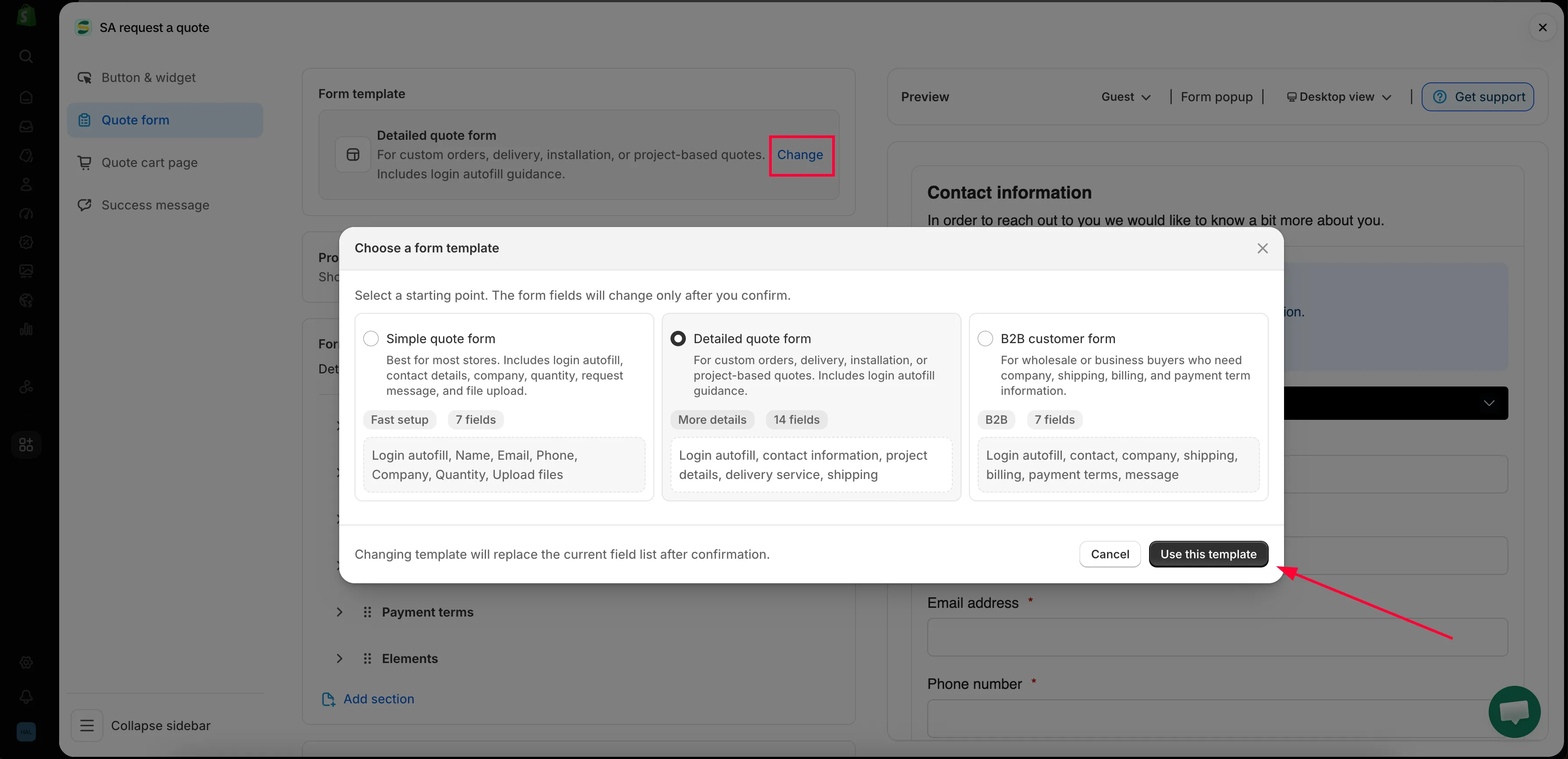
Change seçiciyi açar ve şablon sekmenin geri kalanını belirler.
Form builder bölümleri
Bölüm başlığı “Form builder bölümleri”Oluşturucudaki bölümler şablonunuzla birlikte gelenlerdir; bu nedenle bu liste her mağazada aynı değildir.
| Şablon | Birlikte geldiği bölümler |
|---|---|
| Detailed quote form | Contact information · Shipping address · Extra info |
| B2B customer form | Contact information · Company information · Shipping address · Billing address · Payment terms · Extra info |
Her bölüm genişletilebilir; böylece içindeki alanları görebilir ve düzenleyebilirsiniz.
| Bölüm | Neleri toplar |
|---|---|
| Contact information | First name, Last name, Email address, Phone number, Address |
| Company information | Company name |
| Shipping address | Country/region, First name, Last name, Company/attention, Address, Apartment suite etc, City, Postal code, Phone number |
| Billing address | Bir Billing address same as shipping address onay kutusu, ardından aynı alanlar tekrar |
| Payment terms | Payment terms, bir Required deposit onay kutusu ve Deposit |
| Extra info | B2B customer form şablonunda Message; Detailed quote form şablonunda Project detail ve Delivery service — ayrıca kendi eklediğiniz diğer alanlar |
Diğer sekmelerde neler var
Bölüm başlığı “Diğer sekmelerde neler var”Satıcıların sıklıkla Quote form sekmesinde aradığı iki şey aslında Quote cart page sekmesindedir:
- Enable Quote Sections — “Lets customers group the products in their quote cart into named sections.”
- Quote form appearance — “Controls how the quote form looks on the quote cart page.” Multiple step veya Single page seçeneğini belirleyin.
Teklif düğmesinin metni ve yerleşimi ise Button & widget sekmesindedir.
Nereden başlamalı
Bölüm başlığı “Nereden başlamalı”- Standart form oluşturma — formunuzu baştan sona oluşturun
- B2B formu oluşturma — şirket, fatura ve ödeme koşullarını içeren B2B customer form
- Müşteri bilgi alanları — iletişim ve adres bilgileri
- Teklif ürün grubu — müşterilerin teklifi adlandırılmış bölümlere ayırmasına izin verin
- Dosya yüklemeye izin verin — uygulamanın hangi dosya türlerini kabul ettiği ve yüklemelerin kullandığı depolama alanı
- Tema stilinize uyum sağlayın — formun mağazanızın geri kalanı gibi görünmesini sağlayın
- reCAPTCHA ekleme — spam gönderimlerini durdurun
Düşündüğünüzden azını isteyin
Bölüm başlığı “Düşündüğünüzden azını isteyin”Eklediğiniz her alan, formu yarıda bırakmak için bir sebeptir. Yalnızca fiyat çıkarmak için gerçekten ihtiyaç duyduğunuz bilgileri isteyin; bunlar genellikle iletişim bilgileri, adetler ve bir serbest metin kutusudur. Gerisini her zaman e-postayla sorabilirsiniz.
Sonraki adımlar
Bölüm başlığı “Sonraki adımlar”- Standart form oluşturma — oluşturmaya başlayın
- Teklif taleplerini toplamaya genel bakış — müşterilerin bu forma nereden ulaştığı