
견적 양식 개요
견적 양식이 있는 위치, 수집할 수 있는 정보, 변경을 시작하기 전에 알아 둘 양식 빌더의 구성을 안내합니다.
견적 양식은 고객이 요청을 보내기 위해 작성하는 양식입니다. 어떤 템플릿으로 시작할지, 어떤 질문을 할지, 어떻게 보일지 등 양식과 관련된 모든 것을 한곳에서 설정합니다.
위치 찾기
섹션 제목: “위치 찾기”Quote settings를 엽니다. 페이지 제목은 Request a Quote이고, 첫 번째 카드는 Customize입니다.
Design how your request a quote experience will look to customers. Set button behavior, quote form, quote cart, widget, colors and messages.
Customize를 클릭하면 전체 화면 편집기가 열립니다. 편집기에는 Button & widget, Quote form, Quote cart page, Success message의 네 가지 탭이 있습니다. 이 페이지의 내용은 모두 Quote form 탭에 있습니다.
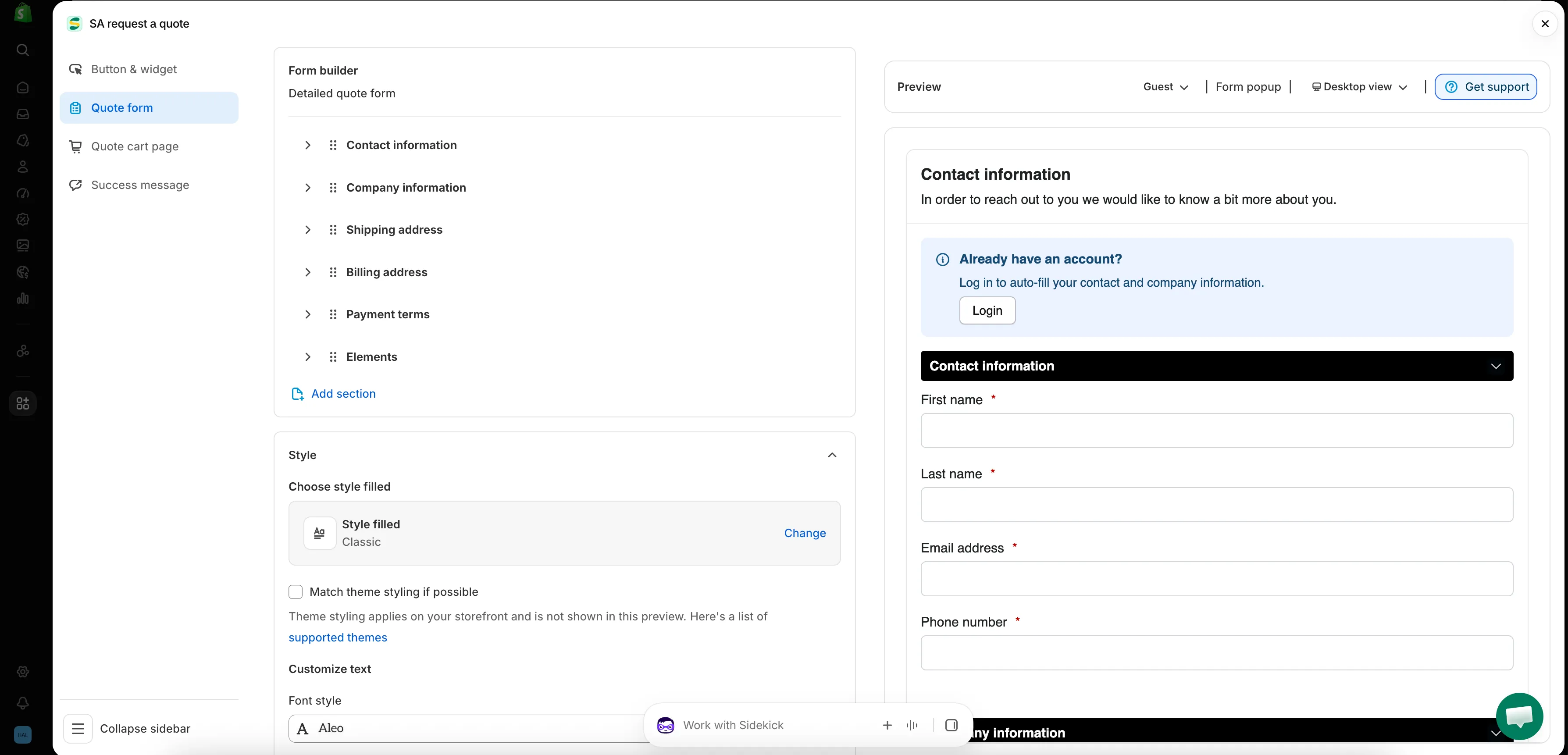
앱의 모든 양식은 이 화면에서 만듭니다.
Quote form 탭의 구성
섹션 제목: “Quote form 탭의 구성”| 섹션 | 제어하는 항목 |
|---|---|
| Form template | 양식을 시작할 템플릿입니다(예: B2B customer form). Change를 클릭하면 템플릿 선택 창이 열립니다. |
| Product page form display | "Show the quote form directly on product pages." Enable product page form display 체크박스로 제어합니다. |
| Form builder | 섹션별로 묶인 질문 자체입니다. Add element는 섹션에 필드를 추가하고, Add section은 새 섹션을 통째로 추가합니다. |
| Style | 스타일 프리셋과 Match theme styling if possible 체크박스입니다. |
| Customize text | 양식의 Font style입니다. |
| Customize form color | Title bar color, Title bar background, Color, Background color, Border color, Quote popup primary color입니다. |
알맞은 템플릿으로 시작하기
섹션 제목: “알맞은 템플릿으로 시작하기”Form template은 탭 맨 위에 있으며, 탭의 나머지 구성을 결정합니다. 선택할 수 있는 템플릿은 여러 가지이고, Change를 클릭하면 선택 창이 열립니다.
| 템플릿 | 앱의 설명 |
|---|---|
| Detailed quote form | "For custom orders, delivery, installation, or project-based quotes. Includes login autofill guidance." |
| B2B customer form | "For wholesale or business buyers who need company, shipping, billing, and payment term information" |
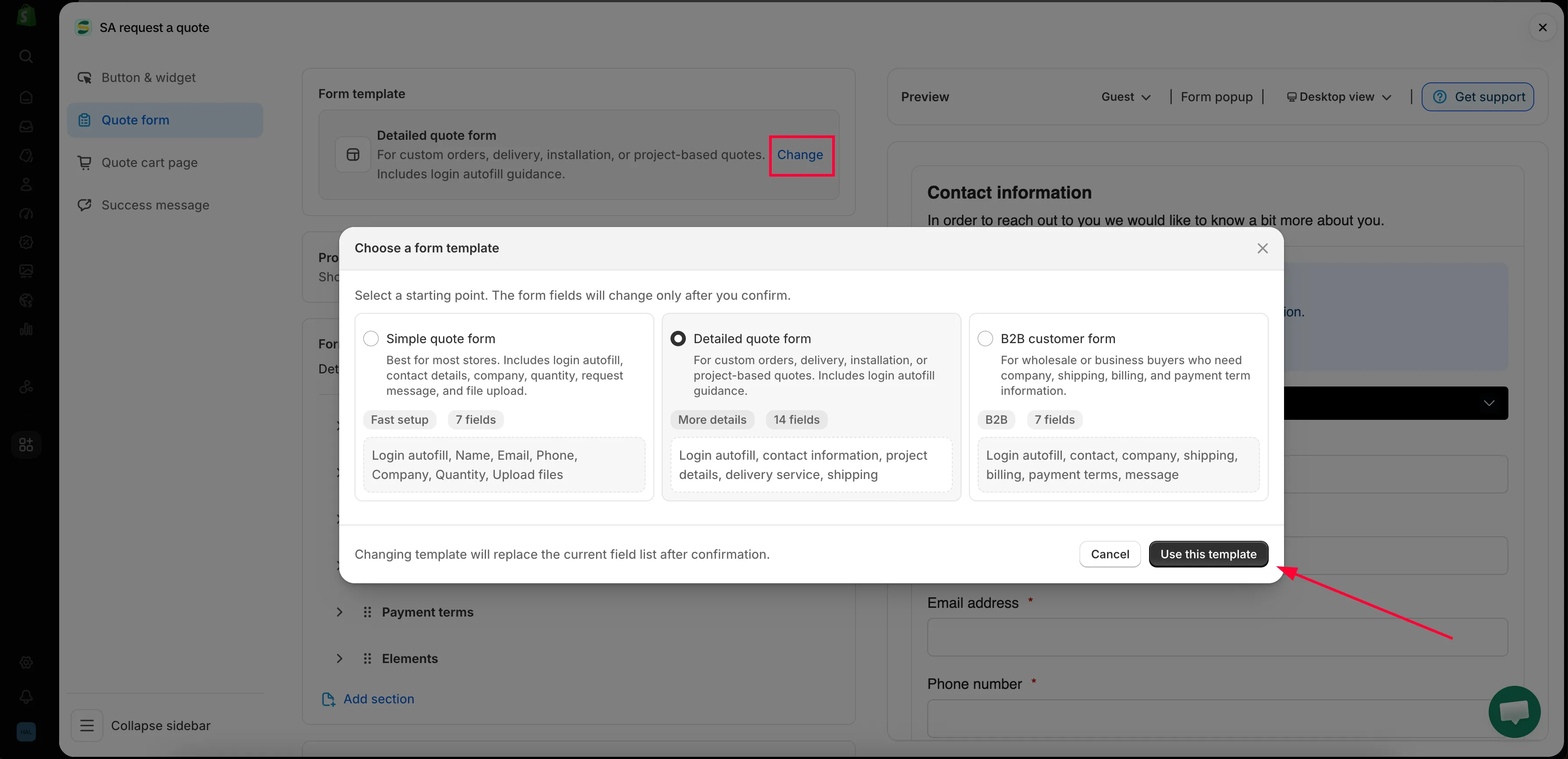
Change를 클릭하면 선택 창이 열리며, 템플릿에 따라 탭의 나머지 구성이 정해집니다.
Form builder의 섹션
섹션 제목: “Form builder의 섹션”빌더의 섹션은 선택한 템플릿에 포함된 섹션이므로, 이 목록은 스토어마다 다를 수 있습니다.
| 템플릿 | 기본으로 포함된 섹션 |
|---|---|
| Detailed quote form | Contact information · Shipping address · Extra info |
| B2B customer form | Contact information · Company information · Shipping address · Billing address · Payment terms · Extra info |
각 섹션을 펼치면 안에 있는 필드를 확인하고 편집할 수 있습니다.
| 섹션 | 수집하는 정보 |
|---|---|
| Contact information | First name, Last name, Email address, Phone number, Address |
| Company information | Company name |
| Shipping address | Country/region, First name, Last name, Company/attention, Address, Apartment suite etc, City, Postal code, Phone number |
| Billing address | Billing address same as shipping address 체크박스, 그리고 같은 필드가 한 번 더 표시됩니다 |
| Payment terms | Payment terms, Required deposit 체크박스, Deposit |
| Extra info | B2B customer form에서는 Message, Detailed quote form에서는 Project detail과 Delivery service이며, 직접 추가한 다른 항목도 함께 표시됩니다 |
다른 탭에 있는 항목
섹션 제목: “다른 탭에 있는 항목”판매자가 Quote form 탭에서 자주 찾지만 실제로는 Quote cart page에 있는 항목이 두 가지 있습니다.
- Enable Quote Sections — “Lets customers group the products in their quote cart into named sections.”
- Quote form appearance — “Controls how the quote form looks on the quote cart page.” Multiple step 또는 Single page를 선택합니다.
견적 버튼 자체의 문구와 위치는 Button & widget에서 설정합니다.
시작하기
섹션 제목: “시작하기”- 표준 양식 만들기 — 양식을 처음부터 끝까지 만들기
- B2B 양식 만들기 — 회사, 청구, 결제 조건을 포함한 B2B customer form
- 고객 정보 필드 — 연락처와 주소 정보
- 견적 제품 그룹 — 고객이 견적을 이름 있는 섹션으로 나누도록 설정
- 파일 업로드 허용하기 — 앱에서 허용하는 파일 형식과 업로드에 사용되는 저장 용량
- 테마 스타일에 맞추기 — 양식을 스토어의 다른 부분과 어울리게 만들기
- reCAPTCHA 추가하기 — 스팸 제출 차단
생각보다 적게 요청하세요
섹션 제목: “생각보다 적게 요청하세요”필드를 하나 추가할 때마다 양식을 중도에 떠나는 이유가 하나 늘어납니다. 가격을 내는 데 꼭 필요한 정보만 요청하세요. 보통 연락처, 수량, 자유 입력란 하나면 충분합니다. 나머지는 이메일로 이어서 확인하면 됩니다.
다음 단계
섹션 제목: “다음 단계”- 표준 양식 만들기 — 만들기 시작
- 견적 요청 수집 개요 — 고객이 이 양식에 접근하는 경로