
詢價表單總覽
詢價表單的位置、可收集的資料,以及在開始變更之前,Form builder 的組織方式。
詢價表單是顧客用來向您送出詢價的表單。從起始範本、要詢問的問題到外觀,一切都在同一個地方設定。
開啟 Quote settings。頁面標題是 Request a Quote,第一張卡片是 Customize:
Design how your request a quote experience will look to customers. Set button behavior, quote form, quote cart, widget, colors and messages.
點擊 Customize 開啟全螢幕編輯器。編輯器有四個分頁:Button & widget、Quote form、Quote cart page 和 Success message。本頁的所有內容都在 Quote form 分頁。
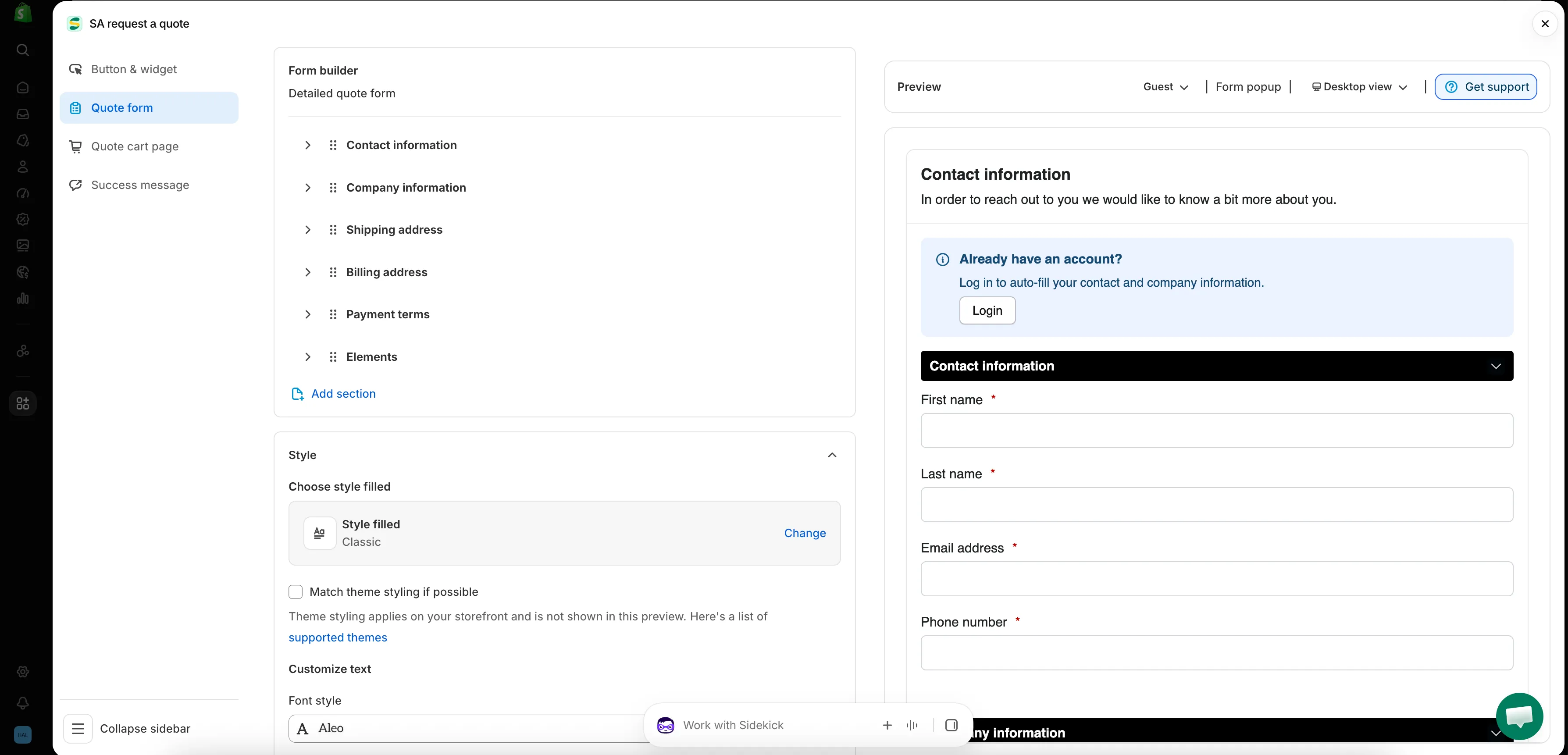
App 中的每個表單都是在這個畫面上建立的。
Quote form 分頁的組織方式
Section titled “Quote form 分頁的組織方式”| 區段 | 控制的內容 |
|---|---|
| Form template | 表單起始使用的範本,例如 B2B customer form。Change 會開啟範本選擇器。 |
| Product page form display | "Show the quote form directly on product pages." 由 Enable product page form display 核取方塊控制。 |
| Form builder | 問題本身,依區段分組。Add element 在區段中新增欄位;Add section 新增整個區段。 |
| Style | 樣式預設組合,以及 Match theme styling if possible 核取方塊。 |
| Customize text | 表單的 Font style。 |
| Customize form color | Title bar color、Title bar background、Color、Background color、Border color 和 Quote popup primary color。 |
從合適的範本開始
Section titled “從合適的範本開始”Form template 位於分頁頂端,它決定了分頁其餘部分的樣貌。可選擇的範本不只一個,Change 會開啟選擇器。
| 範本 | App 的說明 |
|---|---|
| Detailed quote form | "For custom orders, delivery, installation, or project-based quotes. Includes login autofill guidance." |
| B2B customer form | "For wholesale or business buyers who need company, shipping, billing, and payment term information" |
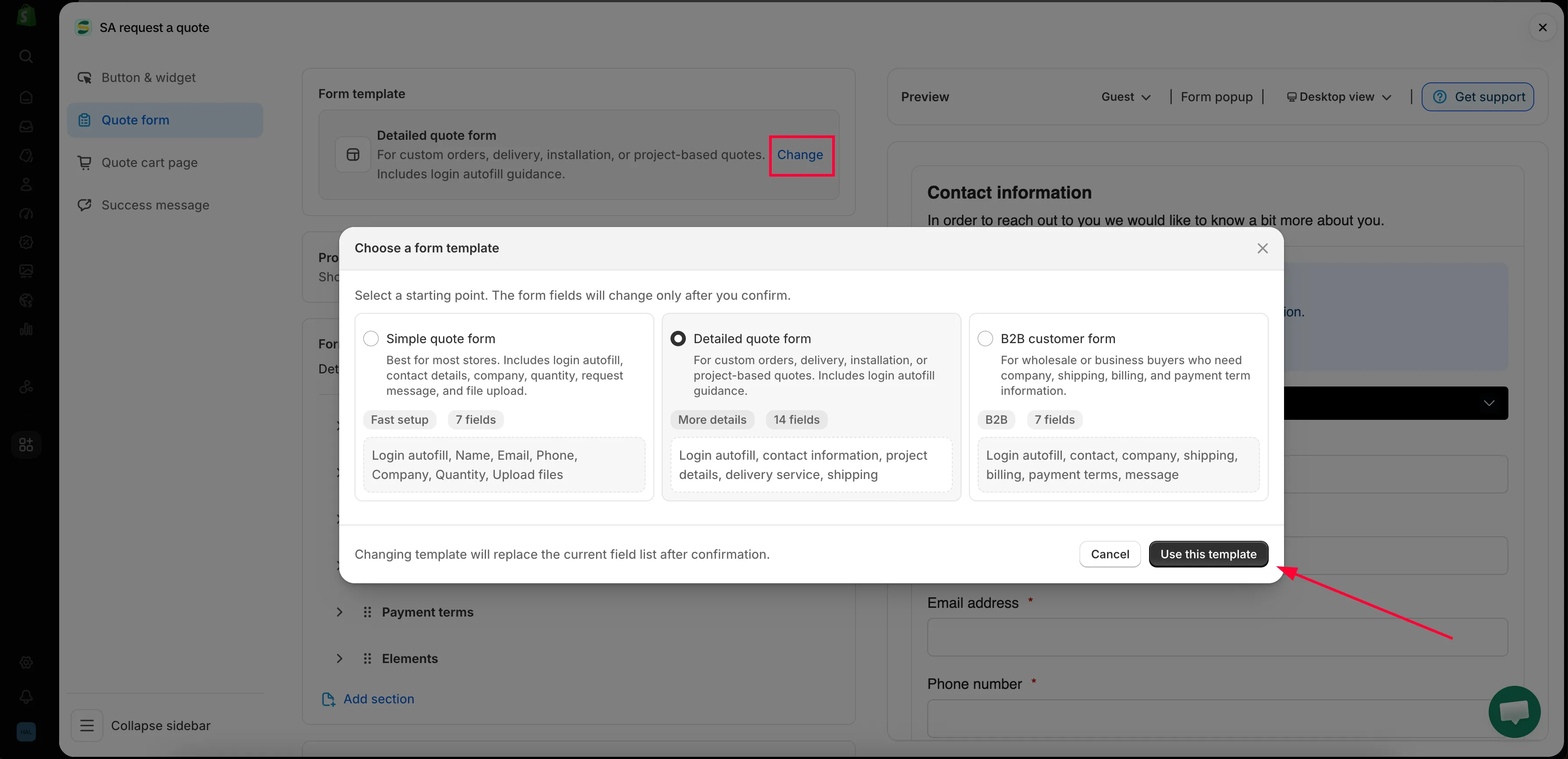
Change 會開啟選擇器,範本決定分頁其餘部分的內容。
Form builder 中的區段
Section titled “Form builder 中的區段”Form builder 中的區段是您的範本預設帶入的,因此這份清單在每家商店並不相同。
| 範本 | 預設包含的區段 |
|---|---|
| Detailed quote form | Contact information · Shipping address · Extra info |
| B2B customer form | Contact information · Company information · Shipping address · Billing address · Payment terms · Extra info |
每個區段都可展開,讓您查看並編輯其中的欄位。
| 區段 | 收集的資料 |
|---|---|
| Contact information | First name, Last name, Email address, Phone number, Address |
| Company information | Company name |
| Shipping address | Country/region, First name, Last name, Company/attention, Address, Apartment suite etc, City, Postal code, Phone number |
| Billing address | 一個 Billing address same as shipping address 核取方塊,其後是相同的欄位 |
| Payment terms | Payment terms、一個 Required deposit 核取方塊,以及 Deposit |
| Extra info | B2B customer form 上有 Message;Detailed quote form 上有 Project detail 和 Delivery service,另外還有您自己新增的任何內容 |
其他分頁上的設定
Section titled “其他分頁上的設定”商家常在 Quote form 分頁尋找的兩項設定,其實位於 Quote cart page:
- Enable Quote Sections:“Lets customers group the products in their quote cart into named sections.”
- Quote form appearance:“Controls how the quote form looks on the quote cart page.” 可選擇 Multiple step 或 Single page。
詢價按鈕本身的文字與位置則在 Button & widget 中設定。
- 建立標準表單:從頭到尾建立您的表單
- 建立 B2B 表單:B2B customer form,包含公司、帳單和付款條款
- 顧客資訊欄位:聯絡與地址資料
- 報價商品群組:讓顧客把報價拆分成具名區段
- 允許檔案上傳:App 接受的檔案類型,以及上傳佔用的儲存空間
- 配合佈景主題樣式:讓表單與商店其他部分的外觀一致
- 新增 reCAPTCHA:阻擋垃圾提交
少問一點,比您想的更好
Section titled “少問一點,比您想的更好”每多一個欄位,就多一個讓人放棄填寫的理由。只詢問您報價真正需要的資料,通常是聯絡資料、數量和一個自由輸入文字框。之後您隨時可以用電子郵件跟進。