
最新消息
如果您在改版前就使用過 SA Request a Quote,這裡整理了值得了解的變更,以及每項設定現在的位置。
應用程式已經改版。如果您是在舊版時設定商店,您記得的設定仍然存在,只是大多數已移到其他位置。本頁涵蓋那些變更了位置,或新增了先前沒有的功能的調整。
2026 年 9 月
Section titled “2026 年 9 月”Translations AI
Section titled “Translations AI”過去翻譯代表要為每種語言逐一手動輸入每個字串,現在不需要了。
Advanced settings > Translations 現在提供 Translations AI,應用程式中的說明為 “Translate everything your customers see — quote form, storefront text and both quote emails.”。一個動作就涵蓋這三項,所以表單和電子郵件不會彼此不一致。
此索引標籤會列出您的語言及其狀態,每一列都有 Translate 動作。這份清單是對應 Shopify,而不是自己維護一份:“To add or remove a language, go to Settings → Languages in your Shopify admin.”
請參閱翻譯商店前台文字。
其餘設定移到哪裡了
Section titled “其餘設定移到哪裡了”| 如果您在找 | 現在位於 |
|---|---|
| 報價表單建立器 | Quote settings > Customize > Quote form |
| 按鈕設定 | Quote settings > Customize > Button & widget |
| 隱藏價格 | Advanced settings > Hide price |
| 郵件通知 | Advanced settings > Email notifications |
| 整合 | Advanced settings > Integrations |
| PDF 範本 | Advanced settings > PDF template |
| 報價上的折扣、運費和稅金 | Cost management,這是新功能 |
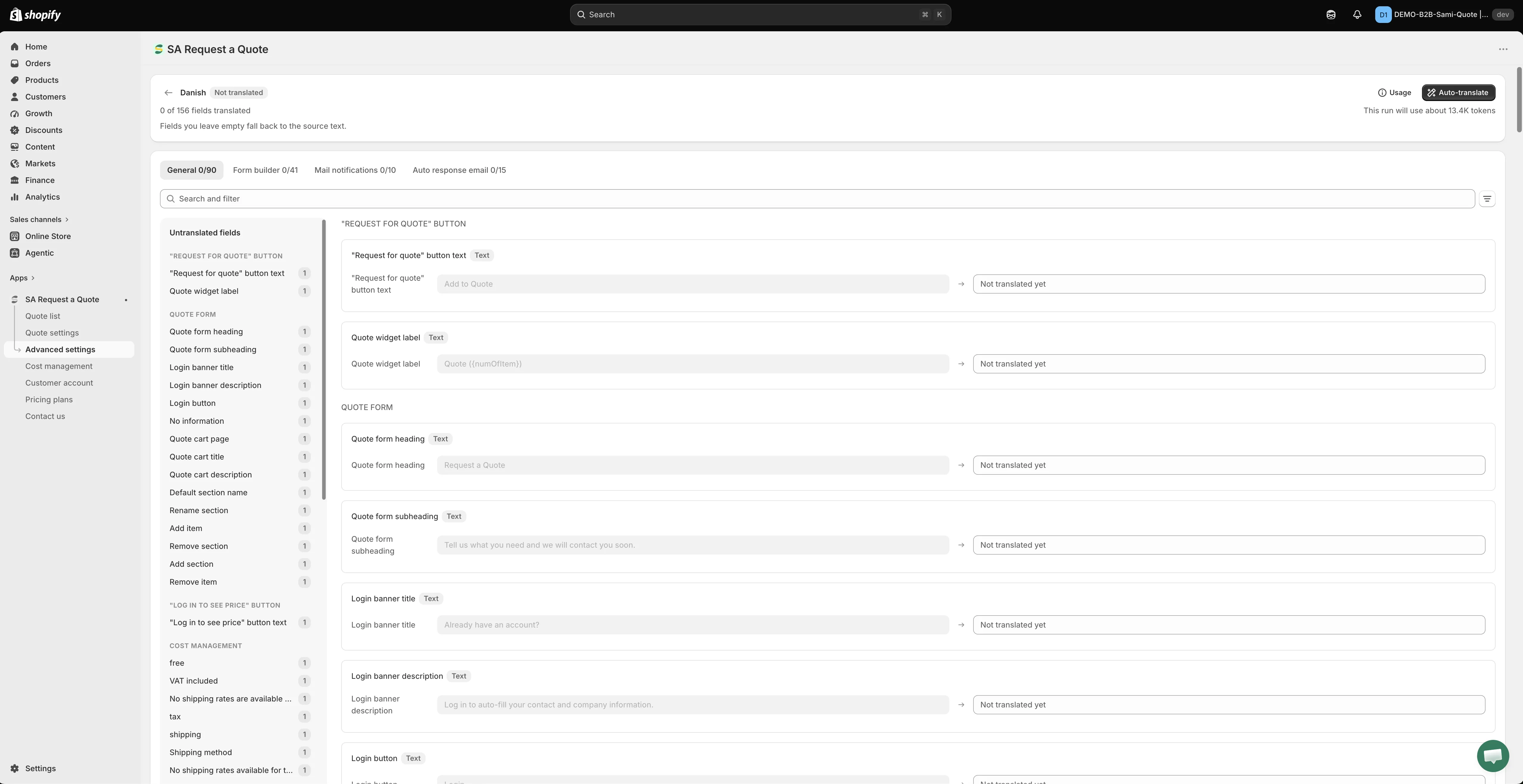
顧客會讀到的每個字串都列在這裡,並附上其翻譯。
2026 年 8 月
Section titled “2026 年 8 月”以 Customize 為核心重新打造的 Quote settings
Section titled “以 Customize 為核心重新打造的 Quote settings”Quote settings 過去是一個包含多個索引標籤的頁面。現在它是一個簡短的頁面,只有兩個項目,細部設定則移到獨立的編輯器中。
| Quote settings 上的項目 | 作用 |
|---|---|
| Customize | "Design how your request a quote experience will look to customers. Set button behavior, quote form, quote cart, widget, colors and messages." 此按鈕會開啟全螢幕編輯器。 |
| Select quote products | "Select products or collections that should show the Request a Quote button." |
Customize 編輯器有四個索引標籤,涵蓋舊版索引標籤頁面的所有設定:
| 索引標籤 | 您在此設定的內容 |
|---|---|
| Button & widget | 按鈕文字、按鈕的位置、點擊後的行為,以及浮動報價小工具 |
| Quote form | 表單本身:範本、區段和欄位 |
| Quote cart page | 商店前台的報價購物車,包括表單是以 Multiple step 還是 Single page 運作 |
| Success message | 顧客送出詢價後看到的內容 |
設定旁邊有 Preview,具有 Online store、Cart 和 Quote list 等自己的索引標籤,讓您在儲存前先看到變更。應用程式提示:“Preview is only for quick checking. Full settings and detailed preview are inside Customize.”
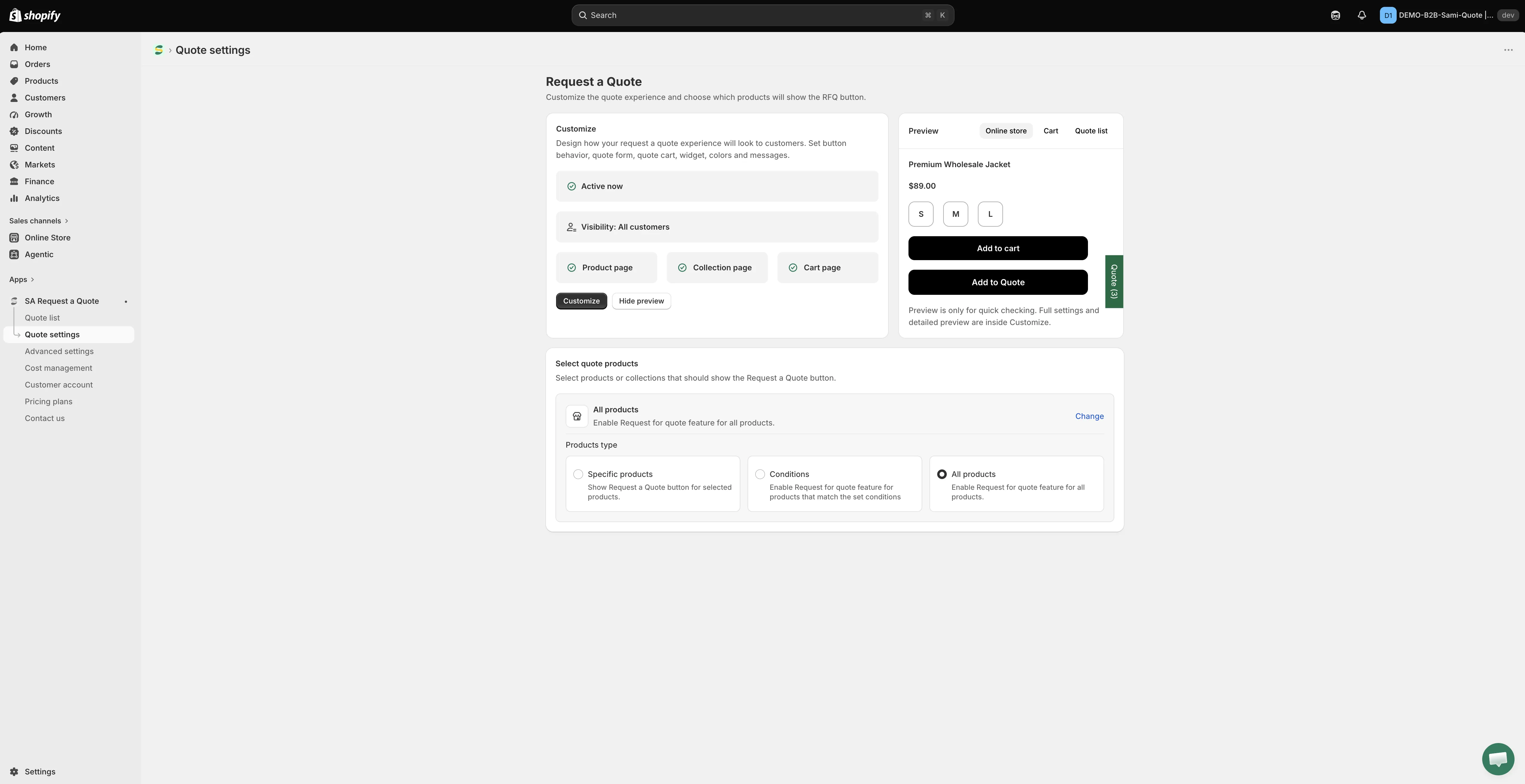
Quote settings 現在很簡短:Customize 會開啟編輯器,Select quote products 用來選擇哪些商品要顯示按鈕。
建立表單請參閱報價表單總覽,按鈕設定請參閱商品頁面上的報價按鈕。
2026 年 8 月
Section titled “2026 年 8 月”重新設計的商店前台報價購物車
Section titled “重新設計的商店前台報價購物車”位於 /pages/request-for-quote 的報價購物車頁面,現在可以改以三步驟精靈運作,而不是一份很長的表單。這三個步驟是 Products selection、Contact information 和 Review information,讓顧客在送出前先確認自己要詢價的內容。
您可以使用 Quote cart page 索引標籤上的 Quote form appearance 在兩種版面之間選擇:Multiple step 或 Single page。
此索引標籤上還有兩項值得了解的設定:
- Enable Quote Sections:“Lets customers group the products in their quote cart into named sections.” 適用於一筆詢價涵蓋多個房間、據點或部門的情況。
- Enable Quote Cart Widget:“Shows a floating button on your storefront so customers can open their quote cart from any page.”
請參閱詢價頁面。
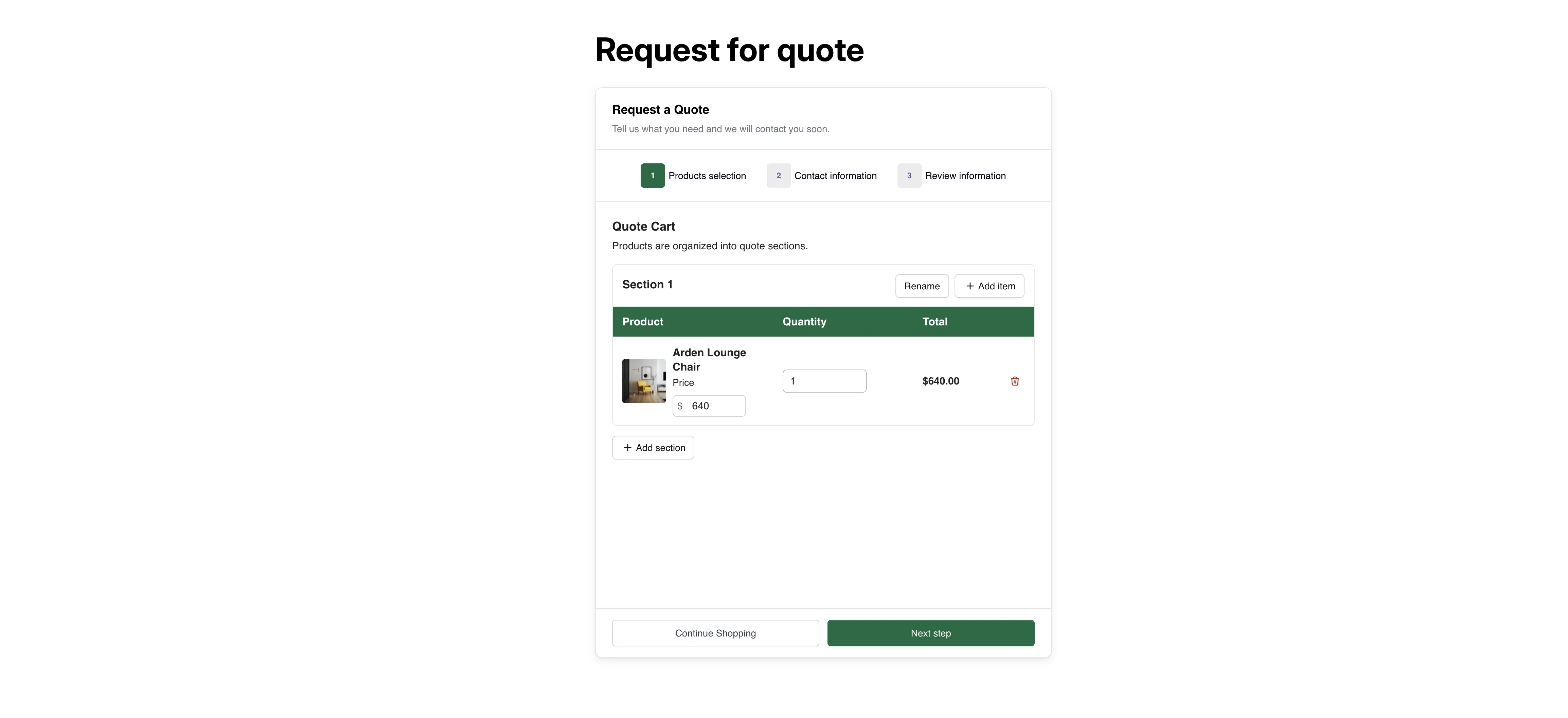
顧客所看到的報價購物車。